Hashtable
java Collections interview Questions
1.Basic java example program to check particular element exist in hashtable - boolean containsKey(Object key) This method used to check particular key exist in hashtable
- package com.CheckElelemtHashtable;
-
- import java.util.Hashtable;
- import java.util.Iterator;
-
- public class HashtableExample{
-
- public static void main(String[] args) {
-
- //create Hashtable object
- Hashtable<String,String> hashtable = new Hashtable<String,String>();
-
- //add key value pairs to Hashtable
- hashtable.put("1","Java Interview Questions");
- hashtable.put("2","Java Interview Programs");
- hashtable.put("3","Concept and exampe program");
- hashtable.put("4","Concept and interview Questions");
- hashtable.put("5","Java Quiz");
- hashtable.put("6","Real time examples");
-
- /*
- To check whether a particular key exists in Hashtable we need to use
- boolean containsKey(Object key) method of Hashtable class.
- if the Hashtable contains mapping for specified key It returns true
- otherwise returns false.
- */
-
- boolean isExists = hashtable.containsKey("5");
- System.out.println("5 exists in Hashtable ? : " + isExists);
-
-
- Enumeration e=hashtable.elements();
-
- System.out.println("Display result:");
-
- // display search result
- while (e.hasMoreElements()) {
- System.out.println(e.nextElement());
- }
- }
-
- }
Output:- 5 exists in Hashtable ? : true
- Hashtable values :
- Display result:
- Real time examples
- Java Quiz
- Concept and interview Questions
- Concept and exampe program
- Java Interview Programs
- Java Interview Questions
Core java Interview Questions
Non Static Blocks in java- When ever object created non static blocks will be executed before the execution of constructor
- Non static blocks are class level block which does not have prototype
- package nonstaticblocks;
- public class A {
-
- {
-
- System.out.println("non static block executed");
-
- }
-
- }
- To execute any logic whenever object is created irrespective of constructor used in object creation.
Who will execute Non static blocks?- Non static blocks are automatically called by JVM for every object creation in java stack area
How many Non static blocks we can create?- We can create any number of Non static blocks
Order of execution of non static blocks- Order of execution of non static blocks will be order as they are defined.
- package nonstaticblocks;
- public class A {
-
- {
- System.out.println("first block");
- }
-
- {
- System.out.println("second block");
- }
-
- {
- System.out.println("third block");
- }
- public static void main(String[] args) {
- A obj= new A();
- }
- }
- first block
- second block
- third block
java Collections interview Questions
LinkedHashSet
1.Basic java example program to remove all elements in linkedhashset - clear() This method used to remove all elements from Linkedhashset.
- package com.removeelementLinkedhashset;
-
- import java.util.LinkedHashSet;
- import java.util.Iterator;
-
- public class LinkedHashsetExample{
-
- public static void main(String[] args) {
-
- LinkedHashSet<String> linkedhashset = new LinkedHashSet<>();
-
- linkedhashset.add("Java Interview Questions");
- linkedhashset.add("Java interview program");
- linkedhashset.add("Concept and example program");
- linkedhashset.add("Concept and interview questions");
- linkedhashset.add("Java Quiz");
-
-
- System.out.println("LinkedHashSet before removal : " + linkedhashset);
-
- boolean blnRemoved = linkedhashset.remove("Java Quiz");
- System.out.println("Was Java Quiz removed from LinkedHashSet ? " + blnRemoved);
-
-
- System.out.println("LinkedHashSet after removal : ");
-
- Iterator it=linkedhashset.iterator();
-
- while(it.hasNext()){
- System.out.println(it.next());
-
- }
- linkedhashset.clear();
- System.out.println("LinkedHashSet after removal all elements");
-
- }
-
- }
Output:- LinkedHashSet before removal : [Java Interview Questions, Java interview program, Concept
- and example program, Concept and interview questions, Java Quiz]
- Was Java Quiz removed from LinkedHashSet ? true
- LinkedHashSet after removal :
- Java Interview Questions
- Java interview program
- Concept and example program
- Concept and interview questions
- LinkedHashSet after removal all elements :[]
Core java Interview Questions
Differences between default constructor and no argument constructor
Default Constructor in java: - When we write a class without any constructor then at compilation time java compiler creates a default constructor in our class.
- The accessibility modifier of the default constructor is same as accessibility modifier of class.
- The allowed accessibility modifier are public and default.
- Default constructor added by java compiler this constructor does not have anything except super(); call.
- package constructor;
- public class A {
-
-
- }
- package constructor;
- public class A {
-
- A(){
-
- super();
-
- }
-
- }
- If our class have any constructor then java compiler does not create default constructor
No-argument Constructor in java:- As a developer we can create our own constructor with no arguments is known as no-argument constructor.
- It can have all four accessibility modifiers as it is defined by developer.
- So allowed accessibility modifiers are public, private, protected and default
- It can have logic including super call.
- package constructor;
- public class A {
-
- A(){
-
- super();
- System.out.println("no -argument constructor");
- }
-
- }
- The common point between default and no-argument constructor
- Both does not have any arguments.
- And one more point we need to remember that in no-argument constructor also by default first statement will be super() call which is added by java compiler if it does not have.
java Collections interview Questions
java programs for freshers
LinkedHashSet
1.Basic java example program to remove particular element in linkedhashset - boolean remove(Object o) This method used to remove specified element from Linkedhashset.
- package com.removeelementLinkedhashset;
-
- import java.util.LinkedHashSet;
- import java.util.Iterator;
-
- public class LinkedHashsetExample{
-
- public static void main(String[] args) {
-
- LinkedHashSet<String> linkedhashset = new LinkedHashSet<>();
-
- linkedhashset.add("Java Interview Questions");
- linkedhashset.add("Java interview program");
- linkedhashset.add("Concept and example program");
- linkedhashset.add("Concept and interview questions");
- linkedhashset.add("Java Quiz");
-
-
- System.out.println("LinkedHashSet before removal : " + linkedhashset);
-
- boolean blnRemoved = linkedhashset.remove("Java Quiz");
- System.out.println("Was Java Quiz removed from LinkedHashSet ? " + blnRemoved);
-
-
- System.out.println("LinkedHashSet after removal : ");
-
- Iterator it=linkedhashset.iterator();
-
- while(it.hasNext()){
- System.out.println(it.next());
-
- }
-
- }
-
- }
Output:- LinkedHashSet before removal : [Java Interview Questions, Java interview program, Concept
- and example program, Concept and interview questions, Java Quiz]
- Was Java Quiz removed from LinkedHashSet ? true
- Java Interview Questions
- Java interview program
- Concept and example program
- Concept and interview questions
java Collections interview Questions
LinkedHashSet
1.Basic java example program to check particular element is exists in linkedhashset - boolean contains(Object o) This method Returns true if this set contains the specified element
- package com.checkelementhashset;
-
- import java.util.LinkedHashSet;
- import java.util.Iterator;
-
- public class LinkedHashsetExample{
-
- public static void main(String[] args) {
-
- LinkedHashSet<String> linkedhashset = new LinkedHashSet<>();
-
- linkedhashset.add("Java Interview Questions");
- linkedhashset.add("Java interview program");
- linkedhashset.add("Concept and example program");
- linkedhashset.add("Concept and interview questions");
- linkedhashset.add("Java Quiz");
-
- /*
- To check whether a particular value exists in LinkedHashSet we need to use
- boolean contains(Object value) method of HashSet class.
- this method returns true if the LinkedHashSet contains the value, otherwise returns false.
- */
-
- boolean isExists = linkedhashset.contains("Java Quiz");
- System.out.println("Java Quiz exists in LinkedHashSet? : " + isExists);
-
-
- Iterator it=linkedhashset.iterator();
-
- while(it.hasNext()){
- System.out.println(it.next());
-
- }
-
- }
-
- }
Output:- Java Quiz exists in LinkedHashSet ? : true
- Java Interview Questions
- Java interview program
- Concept and example program
- Concept and interview questions
- Java Quiz
exception handling interview questions
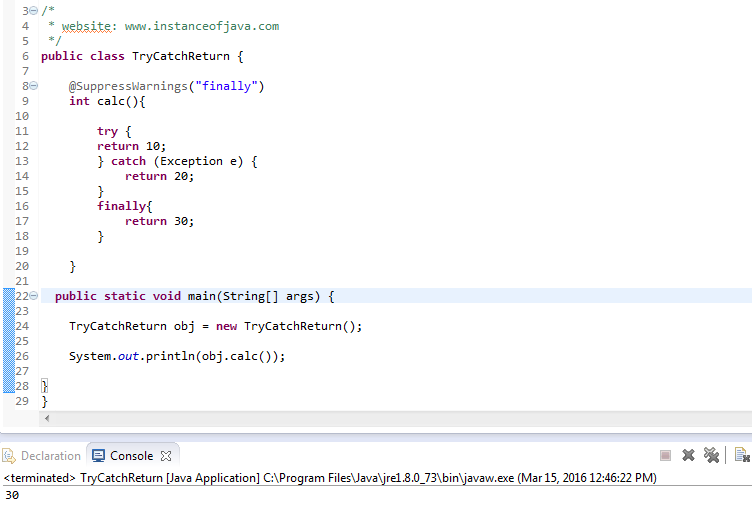
finally with return
Can we write return statement in finally block- Finally block will executes always excepts system.exit().
- So if we are returning some value in finally means it will be returned always
- Finally will executed so method always returns finally return value and no need of keeping return value at end of the method.
- And in finally after return if we keep some statement those statement will be treated as dead code.
i)Return statement in finally block- package com.exceptionhandlingiinterviewquestions;
-
- public class TryCatchReturn{
-
- int calc(){
-
- try {
-
-
- } catch (Exception e) {
-
- }
- finally(){
- return 1;
- }
- System.out.println("End of the method"); // Error : Unreachable code
- }
-
-
- public static void main(String[] args) {
-
- TryCatchReturn obj = new TryCatchReturn();
-
-
- }
- }
- package com.exceptionhandlingiinterviewquestions;
-
- public class TryCatchReturn{
-
- int calc(){
-
- try {
-
-
- } catch (Exception e) {
-
- }
- finally(){
- return 1;
- System.out.println("End of the method"); // Error : Unreachable code
- }
-
- }
-
-
- public static void main(String[] args) {
-
- TryCatchReturn obj = new TryCatchReturn();
-
-
- }
- }
- package com.exceptionhandlingiinterviewquestions;
-
- public class TryCatchReturn{
-
- int calc(){
-
- try {
-
- return 10;
-
- } catch (Exception e) {
- return 20;
- }
- finally(){
- return 30;
-
- }
-
- }
-
-
- public static void main(String[] args) {
-
- TryCatchReturn obj = new TryCatchReturn();
-
- System.out.println(obj.calc())
- }
- }